
Chapter Three: How to Get Started with Condition-Based Maintenance
The Road to Predictive Maintenance Starts with a Few Simple Steps
One of the biggest hesitations around predictive maintenance is the assumption that it requires full AI transformation. Technicians typically report concerns around:
- High implementation costs (25%)
- Lack of technical expertise (24%)
- Limited understanding of AI capabilities (22%)
- Integration with existing systems (21%)
- Data quality and collection challenges (19%)
But in practice, all you need to do is start with clearer use of the condition signals you’re already collecting. When these signals help automate accurate alerts with specific response requirements, you can drive technician buy-in for predictive systems.
Once your team sees the value of predictive maintenance, you can gradually increase your coverage and refine your strategy. This lets you introduce AI-powered predictive and proactive maintenance that meets your needs, rather than attempting widespread deployment that leaves teams and leadership on edge.
Read Chapter Two
See how LLumin’s AI tools help you connect sensors, rules, and real-time alerts to automate predictive maintenance.
Where to Start with Condition-Based Maintenance
Set Single-Condition Thresholds
When you first implement a predictive maintenance program, simple condition-based rules tend to be better than complex models.
Take a look at the condition signals you’re already collecting. Then, set a single threshold like temperature or vibration in your computerized maintenance management system (CMMS) to detect degrading asset health.
‘If-then’ logic is a good place to start. For example, “if motor temperature exceeds 150oF for more than 5 minutes under normal load, then generate an inspection work order”. These kinds of rules don’t require AI, but still offer valuable early warnings.
Combine Multiple Signals for Better Reliability
Once you’re comfortable with your single-condition threshold, try pairing two compatible signals together.
So you might try: “If motor temperature exceeds 150oF for more than 5 minutes under normal load and vibration levels register more than 20, then generate an inspection work order”.
These combined thresholds help reduce false positives, improving your alert accuracy without making things too complicated.
Stick to a maximum of 3-5 meaningful triggers per equipment class, at least to start with. This keeps your workload manageable and protects your team against alert fatigue that can undermine their confidence in your new approach.
Book your free demo of LLumin CMMS+ to find out how you can introduce customizable condition rules with ease.
Review Regularly
During the first 90 days, hold weekly meetings to assess trigger accuracy, eliminate false alarms, and adjust thresholds based on operating context and technician feedback.
This not only lets you improve the value of your automated alerts, but also encourages your team to take ownership of digital transformation in maintenance.
By following predictive maintenance best practices and regularly reviewing the success of your program, you can reduce your maintenance costs while minimizing unnecessary downtime.
How LLumin Automates Inspections, Scheduling, and Alerts

The simplest way to transition to condition-based maintenance is to connect your sensor data to a CMMS like LLumin.
Through LLumin, you can automate calendar-based, condition-based, and later predictive maintenance alerts using one fully customizable user-friendly mobile CMMS platform. Rather than generating work orders, reserving parts, and assigning technicians manually, LLumin does it for you, complete with maintenance instructions and asset history logs.
If an issue isn’t acknowledged or resolved within a defined time window, LLumin can also escalate to supervisors or trigger a backup response based on urgency. That way, there’s no risk that an alert will be missed or forgotten about.
Once a condition-triggered work order is completed, LLumin stores the sensor values, technician notes, and outcomes. You can then access this data for future analysis, and use it as the basis of your future predictive programs.
Top 10 Metrics You Can Improve with LLumin
LLumin’s gives you real-time visibility into the key performance indicators that matter most. With a few simple changes, you can dramatically improve these top 10 common markers of success.
Enhance Your KPIs with LLumin CMMS+
| Metric | What It Measures | Why It Matters | How LLumin Helps | Good Benchmark |
|---|---|---|---|---|
| Mean time to repair (MTTR) | Average time to diagnose, repair, and restore equipment | Shows responsiveness and repair efficiency | Logs timestamps through work orders to identify bottlenecks | Under 5 hours overall, under 2 hours for critical assets |
| Mean time between failures (MTBF) | Average operating time between failures | Reflects asset reliability and effectiveness of maintenance strategy | Tracks all failure instances to calculate accurate uptime | Steady year-on-year improvement rather than a fixed number |
| Planned maintenance percentage | Percentage of hours spent on scheduled vs reactive tasks | Higher planned work correlates with lower unplanned disruption | Automatically classifies and tallies time by task type | 70–80% planned indicates strong scheduling |
| Work order completion rate | Percentage of work orders finished within target time | Helps gauge team performance and task prioritization | Real-time visibility into open, completed, and overdue orders | Over 90% overall, with 100% for critical tasks |
| Maintenance backlog | Pending maintenance work in hours or days | Signals capacity strain or planning gaps | Compares queue to available labor hours for prioritization | 2-4 weeks of approved work |
| Inventory turnover rate | How often parts are used and replaced annually | Balances stocking costs against risk of stockouts | Tracks parts consumption and links usage to work orders | 3-6 turns per yea |
| Downtime by type | Hours of scheduled vs unscheduled downtime | Distinguishes controllable downtime from failures | Logs reasons and durations for each downtime event | 80% or more scheduled in uptime-critical settings |
| Maintenance cost per unit of production | Total maintenance expense divided by output | Connects maintenance spend to production efficiency | Integrates cost data with output from ERP/MES systems | Stable or decreasing as production volume increases |
| Technician utilization rate | Percentage of techs’ hours spent on productive tasks | Reveals inefficiencies in scheduling and idle time | Tracks clock-in/out, task durations, and idle periods | 60-75% is sustainable, above 80% risks burnout |
| First-time fix rate | Percentage of tasks fixed without follow-up visits | Higher rates mean fewer delays and lower costs | Captures outcomes and root cause history per task | 85% or higher indicates strong execution |

How Much Could You Reduce MTTR with LLumin?
Common Mistakes in Early Predictive Maintenance Programs
While predictive maintenance can revolutionize your efficiency, around 80% of facilities fail at predictive maintenance due to simple, avoidable missteps in implementation.
Understanding these early-stage mistakes and how to fix them will help you build a reliable program that delivers measurable results right from the start.
Predictive Maintenance Program Red Flags
| Common Mistake | Why It Happens | Why It’s a Problem | How to Fix IT |
|---|---|---|---|
| Deploying too many triggers too quickly | Teams want fast results and activate every available alert | Alert fatigue sets in, important signals get ignored, confidence drops | Start with a small number of high-value triggers per asset class and expand gradually |
| Using manufacturer thresholds | OEM specs feel safe and easy to apply | Conservative limits create false positives or miss early degradation | Base thresholds on your own historical operating data and real load conditions |
| Skipping failure mode mapping | Teams focus on data before defining failure patterns | Alerts lack context, leaving technicians unsure how to respond | Map known failure modes first, then tie each trigger to a clear response action |
| Not involving technicians early | Programs are often driven by engineering or IT | Low adoption, resistance, and poor-quality feedback | Include frontline staff in trigger design and review alert usefulness regularly |
| Not connecting alerts to workflows | Monitoring tools are implemented separately from the CMMS | Data is collected but no action is taken consistently | Ensure every alert can generate a work order, assignment, or escalation automatically |
| Treating predictive as a side project | Leadership wants to “pilot” without disrupting existing routines | Predictive insights compete with daily priorities and lose momentum | Embed predictive triggers into standard planning, scheduling, and reporting cycles |
| Waiting for perfect data | Fear of inaccuracy delays rollout | Improvement is postponed while preventable failures continue | Start with reliable condition signals and refine thresholds over time |
Simple Changes Drive Big Results with LLumin CMMS+
It’s much easier to achieve success with an early predictive maintenance program when you prioritize clarity over complexity.
By focusing on a few important conditions and setting simple rules in LLumin CMMS+, you can drive measurable improvements in the metrics that matter.
You don’t need the perfect sensors or full-blown AI implementation right from the start. A straightforward workflow that automates condition alerts and a trusted CMMS platform that connects data to execution are enough to achieve record-breaking maintenance efficiency.
Schedule a free demo of LLumin CMMS+ to explore the possibilities of proactive maintenance.
Read Chapter Four
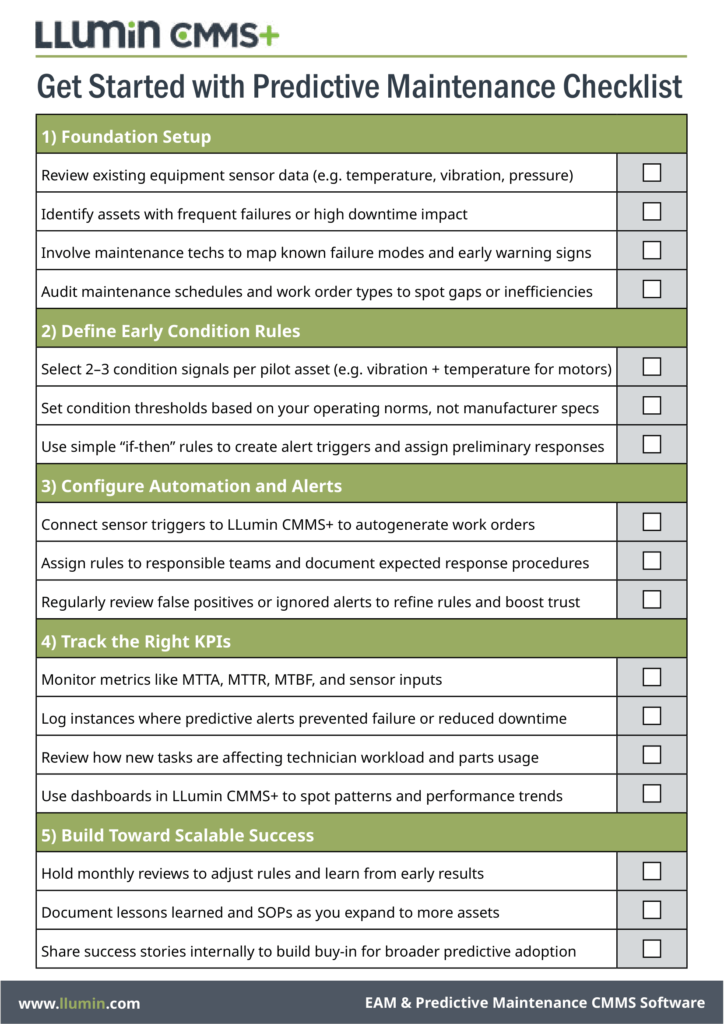
Follow our straightforward checklist for implementing predictive maintenance to reduce downtime by up to 40%.
Download Your Predictive Maintenance Implementation Checklist

Chris Palumbo brings over 13 years of expertise in B2B sales across diverse sectors including Manufacturing, Food and Beverage, Packaging, and Pharmaceuticals. Leveraging 6 years of leadership experience, Chris has successfully guided sales teams within Manufacturing and Distribution to achieve success, particularly in large capital expenditure projects. As Director of Business Development for LLumin, Chris oversees the identification of business opportunities, pushing the development and implementation of a robust business development strategy aimed at accelerating revenue growth. With a proven track record of excellence, Chris has established himself as a respected industry leader and invaluable asset to the LLumin team.