
How Bad Data Affects AI Maintenance (& What to Do About It)

One of the biggest implementation challenges with AI is the over-reliance on it. Too often, managers treat AI as a “set it and forget it” system, where the implementation itself is the only thing requiring human intervention. The AI itself makes up for any infrastructure shortages or gaps.
In reality, AI is only as good as the data it trains on. Data needs to be carefully curated by human hands in order to function well. This article discusses the role of bad data in AI maintenance and the specific structural fixes that must happen before predictive tools are layered into workflows.
AI Is Only as Reliable as the Data Behind It
AI maintenance data accuracy depends entirely on the quality, consistency, and structure of the historical maintenance information fed into predictive models. Catching these problems early on is especially important. Labovitz and Chang’s 1x10x100 rule tells us that fixing a data quality issue at the point of entry may be costly or time-consuming, but correcting the same issue once it’s propagated undetected in the system costs 10x that amount, on average. If left until the decision-making stage, that amount skyrockets to 100x.
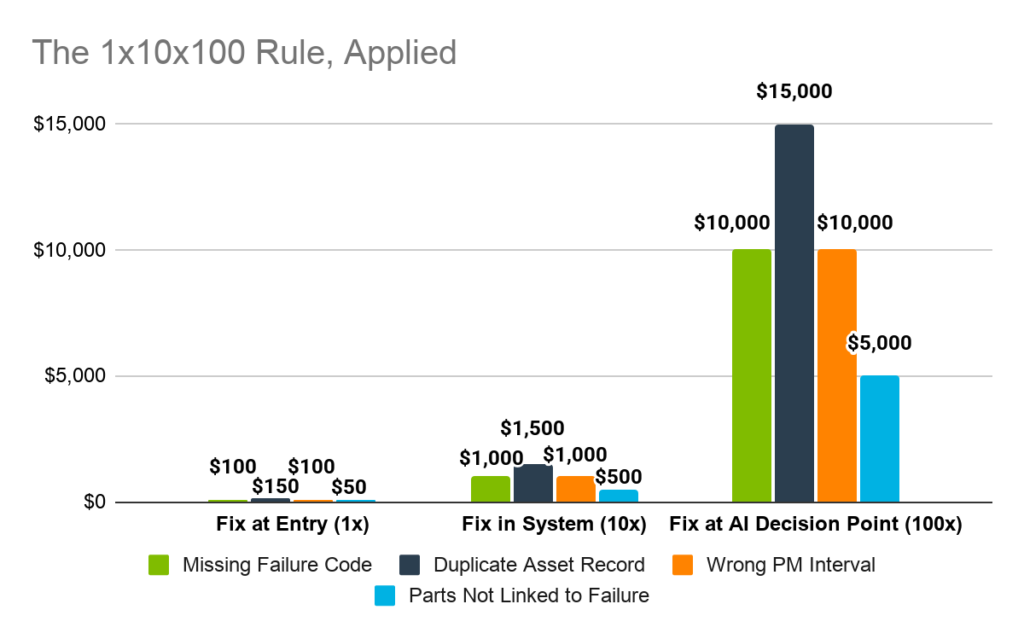
Source 1 | Source 2 | Source 3
*Prices are projected from average repair costs
Poor data quality costs organizations $12.9 million annually on average, and enterprises lose 20-30% of revenue to data-related inefficiencies. The consequences for maintenance teams are more immediate: false positives that waste technician time, false negatives that miss real failures, and alert fatigue that erodes trust in the entire program.
5 Common Data Problems That Undermine AI
Although bad data in AI maintenance has a serious impact, the good news is that there are common patterns within the problems that can be addressed. The following subsections detail the most common data issues facing operational and management teams, as well as the best practices to avoid or relieve them.
1) Incomplete or Inconsistent Work Order History
An incomplete work order history limits a predictive model’s ability to identify recurring failure patterns. When technicians leave failure codes blank, write vague close-out notes, or skip root cause fields under time pressure, the result is unreliable predictive outputs and inflated false positives in AI alerts, calibrated to fit the distorted history.
Fixing Incomplete/Inconsistent Data
| Action | Standard Required |
|---|---|
| Enforce failure codes at close-out | Make the text dropdown a mandatory feature; avoid free text |
| Require root cause notes | Non-optional field before closure |
| Log resolution details | Require logs to include parts used + action taken |
| Audit work order completeness | Monthly review; flag blanks |
2) Inconsistent Asset Hierarchy and Naming
Asset trees need to reflect how equipment operates rather than how it was historically logged. For example, when the same pump appears under three different names across sites or systems, AI models cannot aggregate its failure history into a coherent pattern. Duplicate asset records split failure data into isolated entries that look like separate events rather than a recurring problem.
Correcting Asset Hierarchy Issues
| Action | Standard Required |
|---|---|
| Standardize naming conventions | One naming format per asset class, all sites |
| Merge duplicate records | Single canonical entry per physical asset |
| Rebuild parent-child structure | Components linked to the parent asset |
| Assign a criticality tier to every asset | Informs alert prioritization logic |
3) Missing or Unreliable Failure Classifications
Missing failure codes degrade the quality of AI model training data at the most foundational level. When technicians log symptoms (“machine stopped”) instead of causes (“bearing fatigue”), the model learns to make predictions based on those symptoms. Furthermore, subjective or inconsistent categorization across shifts and teams makes cross-asset pattern detection unreliable, as the same failure type may appear under different labels depending on who closed the work order.
Identifying Missing/Unreliable Classifications
| Action | Standard Required |
|---|---|
| Define standardized failure classifications | Fixed taxonomy, not free text |
| Distinguish symptom, cause, and action | Three separate required fields |
| Train technicians on categorization | Examples provided for each failure type |
| Quarterly categorization audit | Review recurring issues for consistency |
4) Data Silos and Disconnected Systems
When asset records live in one system, work orders in another, and inventory in a spreadsheet, AI models receive fragmented inputs. Maintenance data problems compound when information can’t be integrated into a unified history due to parts consumption that can’t be linked to failure patterns, runtime data that can’t be correlated with breakdown frequency, and maintenance reporting gaps that accumulate across disconnected sources.
Fixing Data Silos
| Action | Standard Required |
|---|---|
| Single CMMS as a source of truth | All work orders, assets, and history in one system |
| Integrate telematics | Runtime data feeds directly into CMMS |
| Connect inventory to work orders | Parts usage tied to asset and failure record |
| Eliminate standalone spreadsheets | No parallel tracking outside CMMS |
5) Inconsistent Technician Data Entry Habits
Technician data entry habits determine whether maintenance reporting accuracy holds across shifts, crews, and sites. When one technician codes a bearing failure as “mechanical,” another as “vibration fault,” and a third leaves the field blank, the AI sees three different events where there was one pattern.
Standardizing Technician Data Entry
| Action | Standard Required |
|---|---|
| Replace free text with dropdowns | Structured inputs for all classification fields |
| Standardize templates across sites | Same work order structure everywhere |
| Monitor reporting consistency | Regular audits flagging deviations |
| Reinforce in training and onboarding | Data discipline is built into technician development |
How LLumin CMMS+ Strengthens Data Before Scaling AI
If we look across the problems analyzed, a few patterns emerge, such as eliminating free text, having specific fields, and regular auditing, that can be fixed in-house. Centralizing and standardizing data, on the other hand, will remain a thorn in everyone’s side without external intervention.
For these problems, working with an all-in-one solution like LLumin CMMS+ will build AI maintenance data accuracy as a byproduct of structured daily execution. Our structured implementation process ensures data foundations are established before predictive capabilities activate, and we cover everything from asset health and condition-based monitoring to comprehensive reporting and mobile access.
LLumin Data Quality Architecture
| Capability | Data Problem Fixed |
|---|---|
| Mandatory work order fields | Incomplete records |
| Dropdown failure code taxonomy | Inconsistent classification |
| ReadyAsset hierarchy | Duplicate and inconsistent asset records |
| PM scheduling automation | Erratic execution history |
| Telematics integration | Runtime data gaps |
| Unified platform | Disconnected system fragmentation |
| Mobile work orders | Inconsistent field data entry |
Build Confidence in AI with Clean Data from LLumin CMMS+
Bad data in AI maintenance erodes technician trust. Once this trust is lost, recovering it is far harder than building it correctly from the start. Improving AI maintenance data accuracy requires disciplined processes, structured asset records, and consistent documentation enforced at every level of the maintenance workflow.
Book your free demo to see how LLumin CMMS+ helps you clean your maintenance data before scaling AI across your operations. You can also use the CMMS ROI calculator and the MTTR ROI calculator to quantify what better data quality is worth for your program.
Frequently Asked Questions
Why does bad maintenance data affect AI predictions?
AI predictive models learn from historical patterns. When that history is incomplete, inconsistently recorded, or fragmented across disconnected systems, the AI models train on gaps and distortions rather than representative failure data. The output is miscalibrated alerts, including false positives that trigger unnecessary maintenance actions, and false negatives that miss developing failures entirely.
Can AI work with an incomplete work order history?
It can function, but not reliably. Predictive models require sufficient historical data to establish meaningful baselines and detect failure patterns that typically occur after 6-12 months, assuming consistent work order records per asset. However, with an incomplete work order history, models either can’t calibrate thresholds accurately or train on distorted patterns that produce the wrong alerts.
What does maintenance data need to look like for AI to work?
AI model training data for maintenance requires four conditions:
- Completeness: Failure code, root cause, action taken, and parts used are recorded on every work order
- Consistency: Same classification taxonomy used across all shifts, crews, and sites
- Structure: Assets organized in a clean parent-child hierarchy with no duplicates
- Integration: All data flowing into one system rather than being split across CMMS, spreadsheets, and disconnected platforms
What causes false positives in predictive maintenance systems?
False positives in AI alerts have four primary causes: sensor drift producing systematically inaccurate readings that make healthy equipment appear degraded; static thresholds not calibrated to each machine’s specific normal behavior; single-sensor alerts triggering without multi-sensor corroboration; and poor training data that makes the model overly sensitive because it hasn’t learned what normal actually looks like for that asset.
How do you prepare maintenance data for AI?
Cleaning maintenance data for AI requires five sequential fixes: enforce complete work order documentation by making failure codes and root cause notes mandatory at close-out; standardize asset naming and rebuild a clean hierarchy to eliminate duplicates; define a failure classification taxonomy that technicians must use consistently; consolidate all maintenance data into a single CMMS to eliminate silos; and replace free-text data entry with structured dropdown inputs to enforce consistency across shifts and sites.
